





Documents sit around for weeks
Invoices in the email inbox, timesheets in the van, delivery notes in a folder. None of it is where the invoicing happens.

Cost Tracking
Structive Software · Cost Tracking
Incoming invoices, outgoing invoices and employee hours come together per site: upload the invoice, import the timesheet, check, approve. You see what came in and what went out, up to date every day, without waiting for the monthly close.
Register yourself. First site created in five minutes. 30 days free.
5 min
Register, create a site, upload the first invoice. No setup project, no training. Five minutes is something anyone can spare.
The working day without a system
In many businesses the figures sit scattered: invoices in accounting, hours on notes, the overview in an Excel list that is never current. By the time everything is brought together, the site is finished.
Invoices in the email inbox, timesheets in the van, delivery notes in a folder. None of it is where the invoicing happens.
Booking every invoice to the right site by hand, splitting shared invoices in your head — every month again.
The figures are there, but not per site. How each site is doing stays a gut feeling.
Systems built for corporations demand upkeep that nobody in a 15-person business has time for.
If you recognise any of these, a trial costs nothing.
How it works
Five steps. Uploading takes seconds, the reading runs in the background, approval happens in the office.
Step 01
Every site has its own upload field. Drag the invoice in as a PDF, incoming or outgoing. You can also create an invoice by hand without a file.
Step 02
Supplier, invoice number, date, amount and tax rate are recognised. A person checks and approves.
Step 03
Upload timesheets. Hours are assigned automatically to the right site.
Step 04
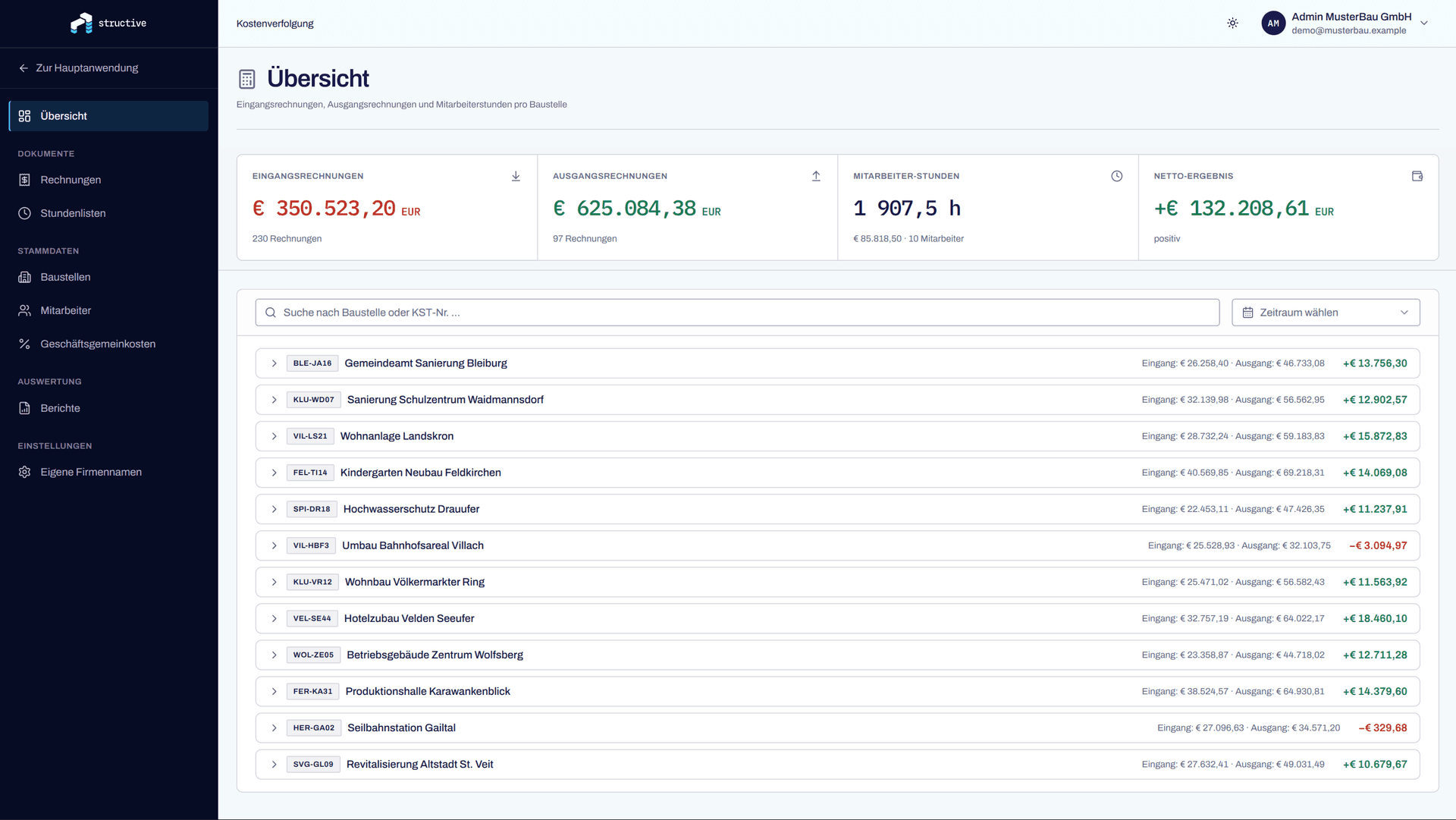
Money in, money out, hours and net figures sit together per site, expandable down to the individual invoice. The site's overhead rate is included in the calculation.
Step 05
Choose sites and period, view the preview, generate it as Excel, PDF or CSV. For the bank, the tax adviser or your own records.
You can run through these steps in the trial with your own documents.
A look inside
Screenshots from the running module. The names and figures in them are test data.
What else is in it
One invoice across three sites. A credit note. A foreign invoice without VAT. A timesheet where one day is split across two sites. That happens every week and is already built in.
One invoice is distributed across several sites by percentage, and the amount per site is recorded with it. For hours, up to three sites per day are possible.
Credit notes run as a negative amount and reverse the costs. Cash discount can be switched on and off per invoice. §19 small businesses and foreign invoices are handled without VAT.
Whether an invoice is a cost or a revenue is decided by matching against your own company names — not by text recognition. You maintain the list of names yourself.
Choose sites and period, check the preview, pull it as Excel, PDF or CSV. Generated reports stay in the history and can be loaded again.
Hourly rate, role, target hours and start date per employee. Valuation uses the rate that applied at the time of the hour — a pay rise does not change old sites.
A separate percentage for each site, editable directly in the list. The allocation feeds into the result.
Built by people who have done the invoicing themselves.
Who it is for
Who works with it
Owners, managing directors, site management and the office. With read-only rights you can also give your tax adviser a view.
Trades
What it is not meant for
Cost Tracking does not replace accounting, payroll or mobile time recording. The hours come from your Excel list. It answers one question: what is happening on which site.
What comes next
In development
Store the estimated costs per site and compare them continuously against the actual ones — not only the hours, but the whole budget.
In development
Evaluate completed sites so the next estimate is based on experience.
In development
Direct handover to accounting so invoices are not captured twice. Until then the figures go out via Excel, PDF or CSV.
FAQ
Something still open? Ask us directly.
Five minutes to the first site: register, create the site with its number and address, upload the first invoice. Employees, overheads and further sites come later, when you need them. There is no setup project that has to be finished first.
The first 30 days are free. The prices after that are not fixed yet — we will talk to you about it before anything costs money. Nobody slides into a subscription automatically after the trial.
No. Cost Tracking is not accounting and does not replace it. It answers the question of what has been incurred on which site. Your accounting stays where it is: figures go out as Excel, PDF or CSV. A direct interface is in development.
Invoices as PDF, one at a time or several in a row. Timesheets as an Excel file in .xlsx format — old .xls files need to be saved once in the new format. Even if your timesheet is laid out differently from the one we built it for, it will be read.
Every invoice sits in review first. As long as it is not confirmed, it does not feed into any analysis. You see the original page next to the fields that were read out and correct whatever does not fit — or reject the invoice. Whether an invoice is a cost or a revenue is not decided by the recognition anyway, but by matching against your own company names.
The preview shows it before saving. A day on two sites without a split is divided equally and shown as such; the same site named twice is merged. Impossible rows — over 24 hours in one day, more than three sites in one cell — are not guessed at but flagged. Site names we cannot match appear in a separate list.
Create the sites, store employees with their hourly rate, set the overhead rate per site and enter your own company names. For a business with a handful of running sites that is one afternoon.
That is what it is built for. There are three roles — administration, editing, read-only — and they come preconfigured. You do not have to maintain a permissions matrix, and nobody has to be assigned to look after the system.
You decide whether someone sees all sites or only the ones assigned to them. Anyone without access does not see the site at all, rather than getting an error message. Read-only rights can view lists and download reports, but cannot upload, change or approve anything.
Yes. Sites are created with your own numbers and names, exactly as they are already called in the business — the timesheet is matched via those too. You do not have to learn a new system of naming.
We do, directly. A call or an email to the same people who built the module. No ticket system, no hold queue.
Get started
Register yourself, 30 days free. If you have questions, get in touch.
Contact
Five details, then we get back to you with a proposed date. The call takes about 30 minutes and costs nothing.
Call directly
+43 664 14 88 558Address
Structive GmbHGoogle Maps map — only loaded when you click.
Loading it transmits data to Google.